Stripe Payments Integration: Build Subscription-Based AI Apps in Minutes
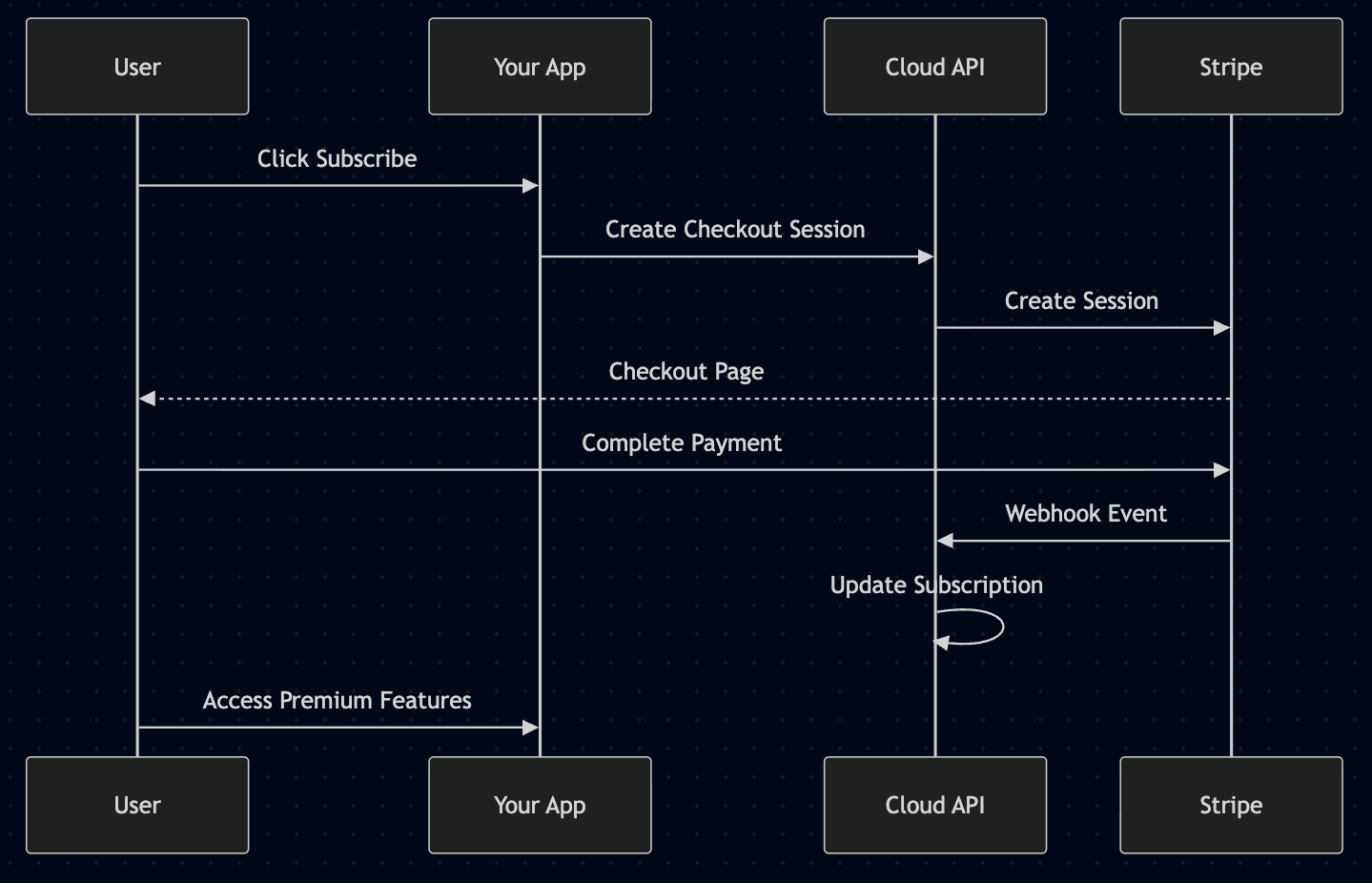
The payment flow in your app using Stripe integration via Dev Kit for AI.
Dev Kit for AI now includes built-in Stripe payment integration, enabling developers to add subscription billing to their AI-powered applications without building payment infrastructure from scratch.
Why This Matters
Building a SaaS application means dealing with payments - subscription management, recurring billing, payment history, and customer self-service. These features typically require weeks of development time and careful security considerations.
With the new Stripe integration in Dev Kit for AI, you can:
- Accept subscription payments through Stripe Checkout with a few lines of code
- Manage subscriptions via the Cloud Admin console without touching code
- Test thoroughly with built-in test/live mode separation
- Let customers self-serve through the Stripe Customer Portal
How It Works
The payment flow is designed to be secure and developer-friendly:
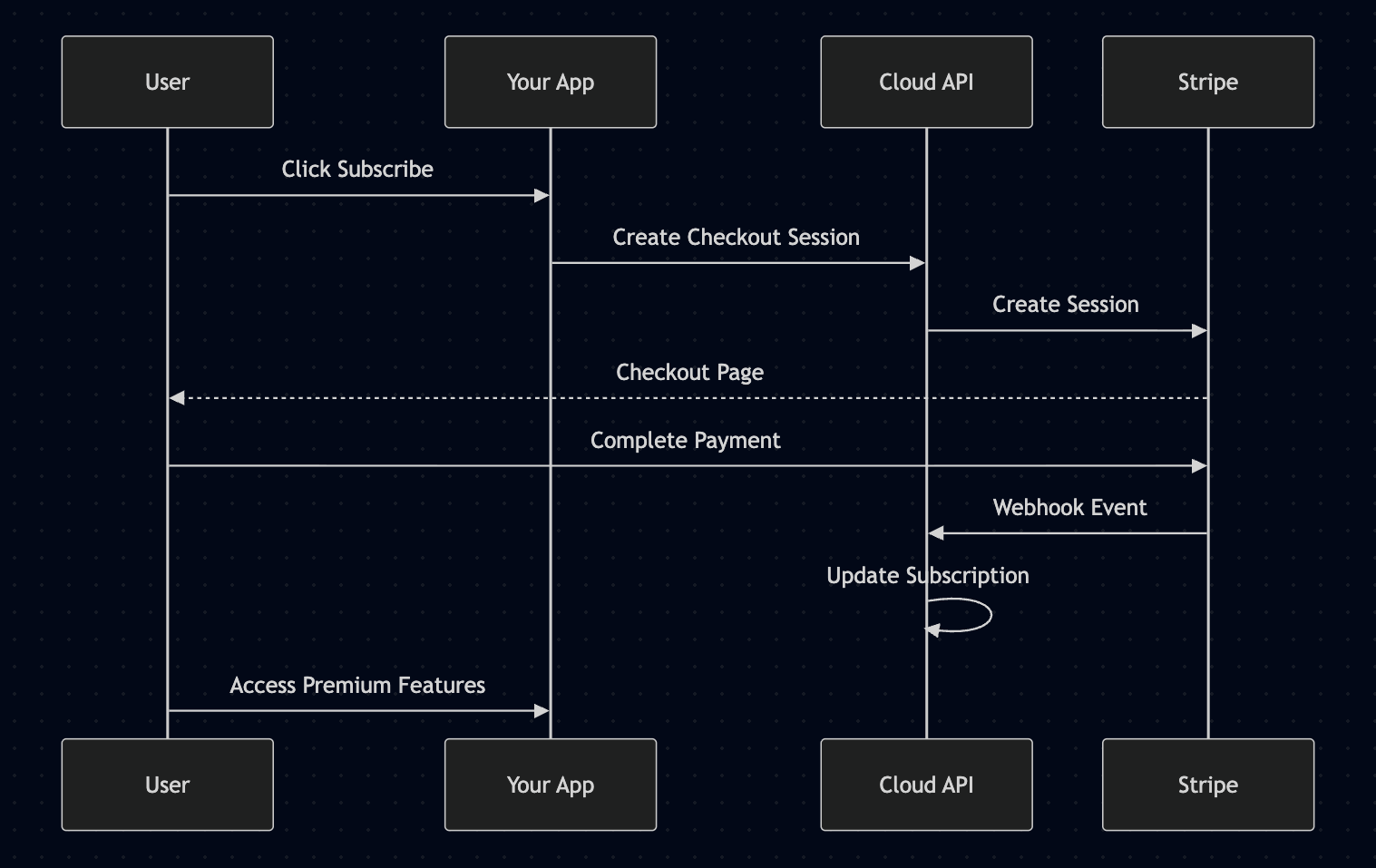
Visit docs.devkit4ai.com/tutorials/integrations/stripe-payments for full technical documentation.
Your application never handles sensitive payment data directly. Stripe Checkout handles the entire payment UI, and webhooks automatically update subscription status in Cloud API.
Quick Start
1. Configure Stripe in Cloud Admin
Navigate to your project's Payments tab and add your Stripe API keys:
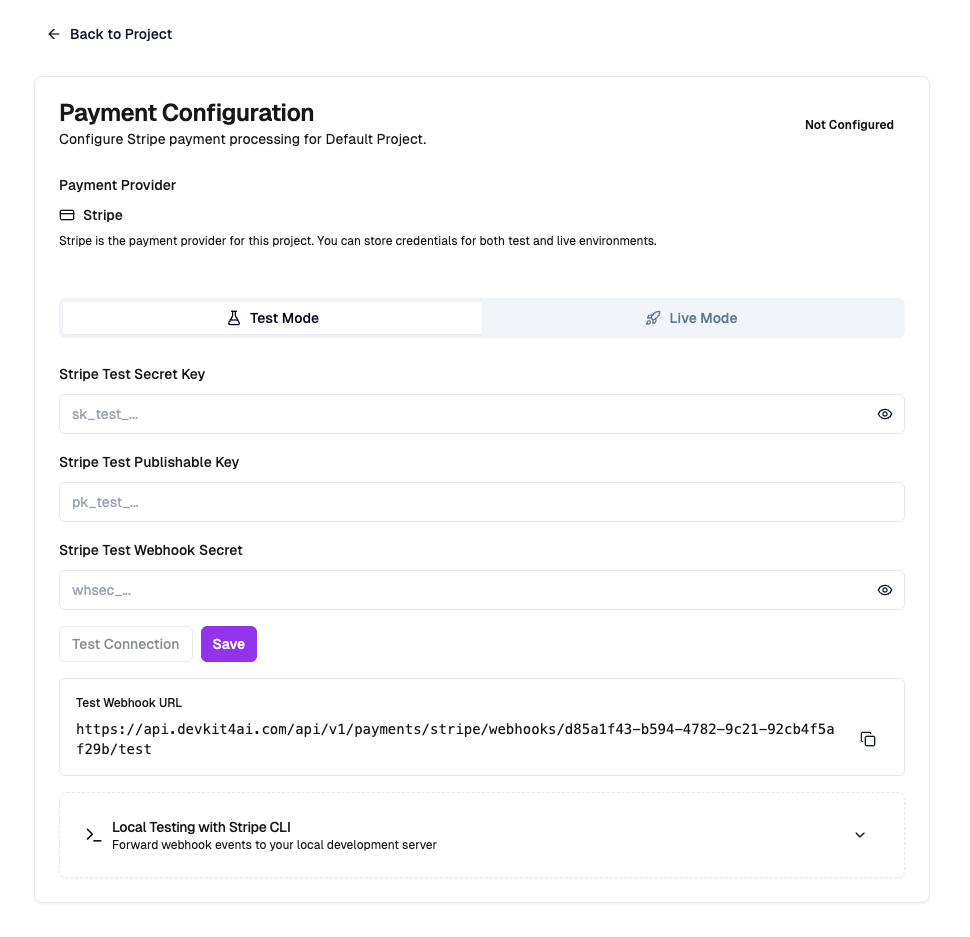
Cloud Admin dialog showing Stripe API key configuration fields with test mode toggle
2. Add a Checkout Button
// app/billing/actions.ts
"use server";

import { cookies } from "next/headers";
import { redirect } from "next/navigation";

export async function createCheckoutSession(priceId: string, testMode: boolean = true) {
  const cookieStore = await cookies();
  const token = cookieStore.get("devkit4ai-token")?.value;

  if (!token) {
    redirect("/login?returnUrl=/pricing");
  }

  const response = await fetch(
    `${process.env.NEXT_PUBLIC_API_URL}/api/v1/payments/stripe/checkout-session?test_mode=${testMode}`,
    {
      method: "POST",
      headers: {
        "Content-Type": "application/json",
        "Authorization": `Bearer ${token}`,
        "X-User-Role": "end_user",
        "X-Developer-Key": process.env.DEVKIT4AI_DEVELOPER_KEY!,
        "X-Project-ID": process.env.DEVKIT4AI_PROJECT_ID!,
        "X-API-Key": process.env.DEVKIT4AI_PROJECT_KEY!,
      },
      body: JSON.stringify({
        price_id: priceId,
        success_url: `${process.env.NEXT_PUBLIC_APP_URL}/billing/success`,
        cancel_url: `${process.env.NEXT_PUBLIC_APP_URL}/pricing`,
      }),
    }
  );

  const data = await response.json();
  redirect(data.checkout_url);
}
3. Monitor in Cloud Admin
Track subscriptions and transactions directly in Cloud Admin:
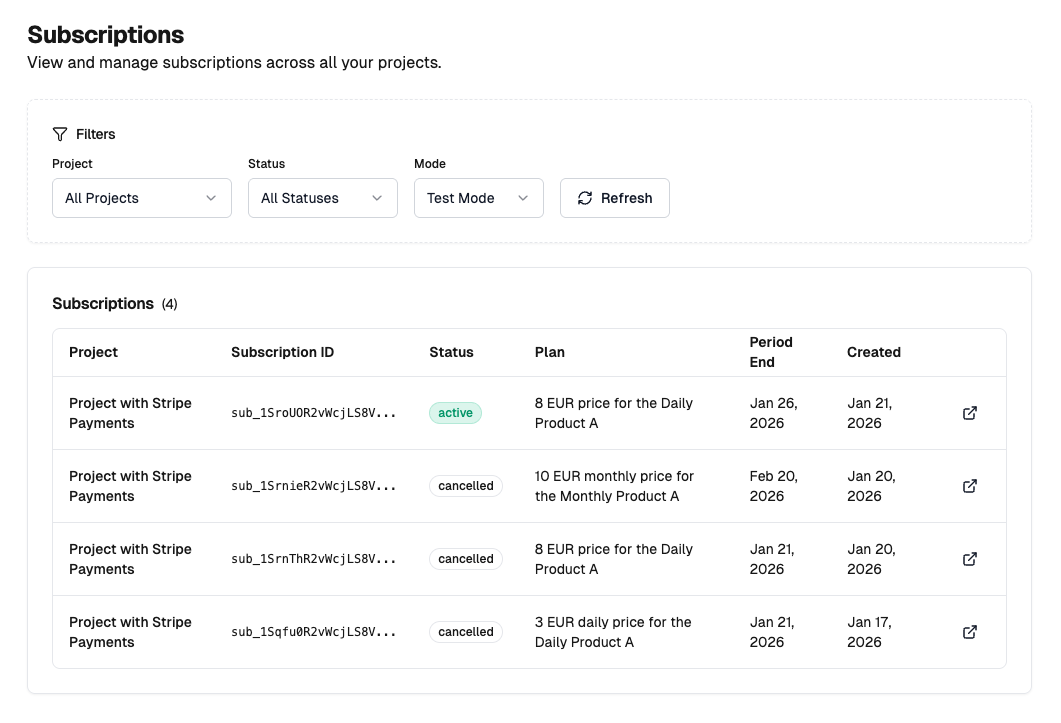
Cloud Admin subscriptions page showing active subscriptions with status, plan name, and period end dates
Key Features
Test/Live Mode Separation
Every payment endpoint supports a test_mode parameter. During development, use test mode with Stripe's test cards. When ready for production, switch to live mode with real Stripe credentials.
// Development
await createCheckoutSession(priceId, true);  // Uses test credentials

// Production
await createCheckoutSession(priceId, false); // Uses live credentials
Customer Self-Service
Enable customers to manage their own subscriptions through Stripe's Customer Portal:
export async function openCustomerPortal(testMode: boolean = true) {
  // ... redirect to Stripe Customer Portal
}
Customers can update payment methods, view invoices, and cancel subscriptions without developer intervention.
Webhook-Driven Updates
Cloud API automatically processes Stripe webhook events to keep subscription data synchronized:
checkout.session.completed- Creates subscription recordcustomer.subscription.updated- Updates subscription statusinvoice.paid- Records successful paymentscustomer.subscription.deleted- Marks subscription as canceled
Available Endpoints
| Endpoint | Purpose |
|---|---|
/checkout-session |
Create Stripe Checkout session |
/my-subscription |
Get current user's subscription |
/my-payments |
Get payment history |
/customer-portal |
Create Customer Portal session |
/cancel-subscription |
Cancel a subscription |
/update-subscription |
Change subscription plan |
Getting Started
- Register at devkit4ai.com
- Clone the Starter Kit
- Configure Stripe keys in Cloud Admin
- Test with Stripe test cards
- Go live when ready
Full documentation: docs.devkit4ai.com/tutorials/integrations/stripe-payments
Dev Kit for AI is a platform for building AI-powered SaaS applications. Start building at devkit4ai.com.